
To read a GEO (generative engine optimization) audit report, start with the URL, run date and evidence behind each finding.
VYDAI's overall score summarizes page-readiness checks under the product's method; it does not forecast brand mentions or citations. Review whether each recommendation applies to the page, how many URLs it affects and how certain the evidence is. Then prioritize fixes and give the team an acceptance check.
Start with the page and the evidence
Check the URL and date first.
A report describes the page retrieved during that run. A redirect, another language version or a security challenge can change what was analyzed. If the site template changed after the audit, confirm the finding on the current page.
In the VYDAI GEO audit, open an individual check and review the document or signal the system received. Read the report in this order: URL and date, critical issues, evidence for important statuses, whether a recommendation applies to the page type, then its priority. “Add markup” alone is not an actionable task. The team needs to know which entity or property is missing and on which page.
What does a GEO score mean?
VYDAI's GEO score summarizes the technical and content checks on a page under its method. It does not measure brand mentions, Google rankings or citation frequency. The AI readiness score is a VYDAI product term for page readiness. Other services may use similar wording for different metrics, so compare the checks before comparing scores. The GEO audit checklist covers how to run the checks.
How VYDAI calculates the score
VYDAI's GEO audit has 33 checks in four categories weighted 35%, 20%, 28% and 17%. The current public GEO audit page describes the check count and categories. Within a category, pass earns the full check weight, warn earns half and fail earns zero. A category score is the earned weight divided by the weight of scored checks, rounded to a whole number. Checks marked na or error are excluded.
Hypothetical calculation: checks weighted 5, 3 and 2 receive pass, warn and fail. The result is 6.5 out of 10, or 65/100. This illustrates the arithmetic; it is not an audit result.
The overall score uses category weights for categories with scored checks. If a category has no scored checks, its weight is excluded and the remaining weights are normalized. If a blocker fails, VYDAI's method caps the overall result at 30. The potential blockers are indexability, AI crawler access and a snippet prohibition. Google's AI features documentation confirms that a page must be indexed and eligible for a snippet to appear as a supporting link in AI Overviews or AI Mode.
How to read the readiness bands
Under VYDAI's scale, 0–39 means minimal readiness, 40–59 limited, 60–79 adequate and 80–100 high. These are product bands, not an industry standard. You cannot compare GEO scores across tools until you compare their checks, weights, exclusions and coverage. The same number may describe different page or brand properties.
GEO audit check statuses
| Status | Meaning | Score effect | What to do |
|---|---|---|---|
pass | The criterion was met | Full weight | Record the result and confirm the needed scope |
warn | A partial problem or ambiguous signal was found | Half weight | Review the evidence and clarify conditions |
fail | The criterion was not met | Zero for that weight | Confirm the problem and assess its priority |
na | The check does not apply | Excluded | Confirm that the exception is appropriate |
error | There was not enough data to conclude | Excluded | Restore collection or rerun the check |
An error does not mean the page passed. A rerun may change the score because more checks now have results. A “Critical” label also does not mean fail; it marks a check's importance, not its result.
Why a score can be capped or unavailable
VYDAI's method caps a score at 30 when an indexability, AI crawler access or snippet eligibility blocker fails. Google separately says that pages must be indexed and eligible to show a snippet to qualify as supporting links in AI Overviews and AI Mode. That eligibility does not guarantee an appearance. Google's AI features requirements.
The report does not show a regular numerical result when it receives a bot-protection challenge, cannot fetch the target page, or when errors exceed 40% of applicable checks. Restore data collection before interpreting a score. The AI crawler access guide explains how to investigate robots.txt, server responses and bot protection.
Validate evidence before creating a task
Expand a check and inspect the excerpt, rule or missing element it reports. For example, when a report flags a cookie wall, confirm that it blocks the main content rather than merely finding the word “cookie” in the site's policy.
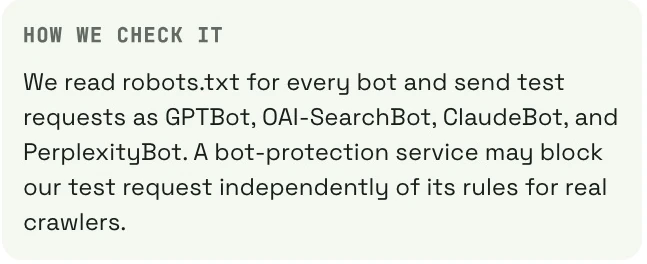
The image shows a crawler access test, including PerplexityBot. This tests page accessibility; it does not monitor brand mentions. For crawler decisions, check the provider's current documentation. OpenAI documents OAI-SearchBot for search and GPTBot for training, with separate controls. OpenAI's crawler documentation.
Before assigning a finding, check the evidence, whether it applies to this page type, how many URLs share the issue and whether the observation can be reproduced. An editor should review assessments of topic coverage or writing quality. An automated check cannot confirm a client agreement, the truth of a case study or current commercial terms.
GEO audit report example: interpreting the scores
The screenshot shows a saved report view with 63/100 overall and category scores of 100, 38, 72 and 0. It illustrates the report format; it is not a client result or a current measurement. The public audit page now shows a different example, because results change between runs. The current VYDAI GEO audit page.
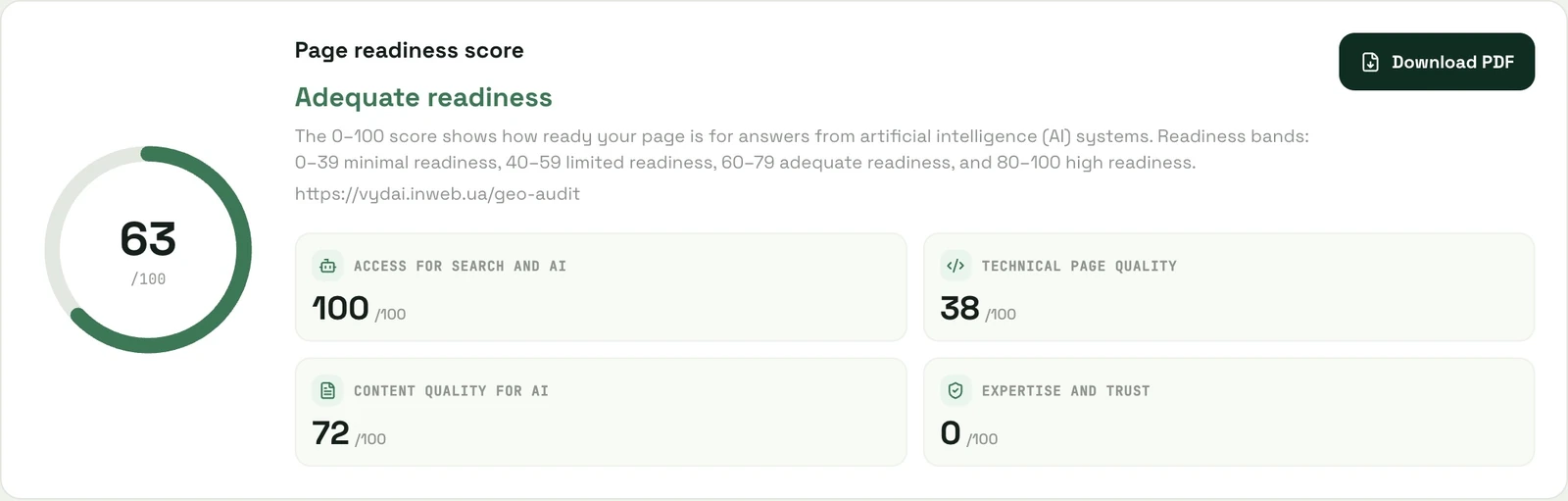
For the displayed categories, a hypothetical calculation using VYDAI's category weights is 100 × 0.35 + 38 × 0.20 + 72 × 0.28 + 0 × 0.17 = 62.76, rounded to 63. Do not use this illustration to assess another site. Individual check results may matter more than the total.
How to prioritize fixes after a GEO audit
Weigh the issue's impact, scope, confidence in the evidence and effort. Resolve dependencies first: if the page was not fetched, editing its content is premature. The following is a team workflow, not a VYDAI traffic forecast.
| Priority | When to use it | Example | Check after the change |
|---|---|---|---|
| P0 | A confirmed barrier affects an important page | An unintended noindex | Fetch the HTML again and inspect the directive |
| P1 | A template error or material inaccuracy affects key pages | Incorrect product canonicals or outdated terms | Check a sample of URLs and verify the facts |
| P2 | Missing information prevents a decision | No comparison criterion or source for a number | Add and verify a direct answer |
| P3 | The issue is presentation without confirmed critical impact | A caption or an extra example | Review readability and relevance |
For a hypothetical pricing page, a mismatch between the listed price and checkout matters more than a suggestion to add an author biography. For a research article with no author or method, the order may differ. The evidence and business context determine the priority.
GEO audit action item template
| Field | What to record |
|---|---|
| URL and template | The page and any other URLs with the same issue |
| Observation | What the audit actually received |
| Evidence | HTML excerpt, server response or dated check result |
| Required result | The specific property that must change |
| Owner | Developer, editor or information owner |
| Acceptance check | How the team will confirm the fix |
Hypothetical editorial action: add an integrations criterion to a comparison table, verify it against product documentation and record the review date. A useful audit action item links one finding to its evidence and acceptance check. This gives an editor a clear task; “improve content for AI” does not.
How to explain a GEO audit report to stakeholders
In a short update, state the page checked, confirmed issue, scope, task owner and acceptance check. Separate evidence from a hypothesis and from visibility metrics that require separate measurement.
Hypothetical example: “We checked the product page template and confirmed that canonical URLs are incorrect and delivery terms conflict with the current policy. The developer will fix the template; the editor will confirm the terms with operations. Acceptance means the sample URLs resolve correctly and the terms agree.” This is an example format, not a client case.
Do not turn a score into a judgment about the whole company. Stakeholders need to see checks that errored, external mentions not reviewed and information available only after login.
How to compare GEO audit results over time
To check whether GEO audit fixes worked, compare the same URLs, method and coverage. Save the change date, then compare statuses and evidence. Keep the same page sample when reviewing results over time. If error changes to fail, data became available for the check; that alone does not prove the page got worse.
| Observation | What it supports |
|---|---|
noindex is absent from retrieved HTML | The directive changed on the inspected page |
| A category score increases | Scored results changed under this method |
| Mentions increase for a fixed prompt set | Observed visibility changed in those runs |
| Organic visits increase | Traffic changed; review seasonality and other factors |
| Leads from tracked visits increase | Business outcomes changed within available attribution |
As of October 2026, Google includes traffic from AI Overviews and AI Mode in the Web search type in Search Console's Performance report. These are combined data, not attribution to one GEO fix. Google's AI measurement documentation. See the AI visibility and SEO metrics guide for separate measures.
Sources and method
VYDAI's GEO audit implementation was checked as of October 2026 for its formula, weights, statuses and scoring limits. The saved 63/100 screenshot is retained as an example of report format, not a current audit or client result. The priority rubric and task templates are editorial examples.
- Google: AI search requirements and measurement
- Google: what structured data does
- Google: helpful content, E-E-A-T and authorship
- OpenAI: search and training crawler roles
- Schema.org: structured data guide
Frequently Asked Questions
Can you compare GEO scores across tools? Only after comparing the checks, weights, excluded checks and coverage. GEO score can describe page readiness or brand presence in AI answers, so the same scale does not guarantee the same measurement.
How can I check whether GEO audit fixes worked? Rerun the same checks on the same URLs, save the evidence and separate technical results from traffic or brand mentions.
Does every fail need to be fixed?
Confirm the finding and whether it applies to the page type. For markup, compare the entity and properties with the Schema.org guide. If you defer the work, record the reason.
Why did the score change without a page edit? The server response, an external resource or the number of scored checks may have changed. Compare the evidence for each status before calling the change an improvement or a decline.
What should a leadership update include? State the confirmed finding, scope, owner and acceptance check. Keep it separate from changes in visibility that need their own measurement.
How often should I rerun an audit? Rerun it after verified fixes or significant site changes. For ongoing checks, keep a stable page sample and choose a cadence that matches how often your site changes.
How we do it in VYDAI
The VYDAI GEO audit shows category scores and individual check results. You can open a check to review its criterion and collected evidence, then download the report as a PDF. The GEO audit checks page readiness. Brand mentions are measured separately in VYDAI monitoring for ChatGPT, Gemini, Claude, Google AI Overviews and Google AI Mode. View the VYDAI demo. For one confirmed issue, a manual check and an acceptance-tested task may be enough. When a check is unclear, reopen the report and review its evidence; your team decides the priority.