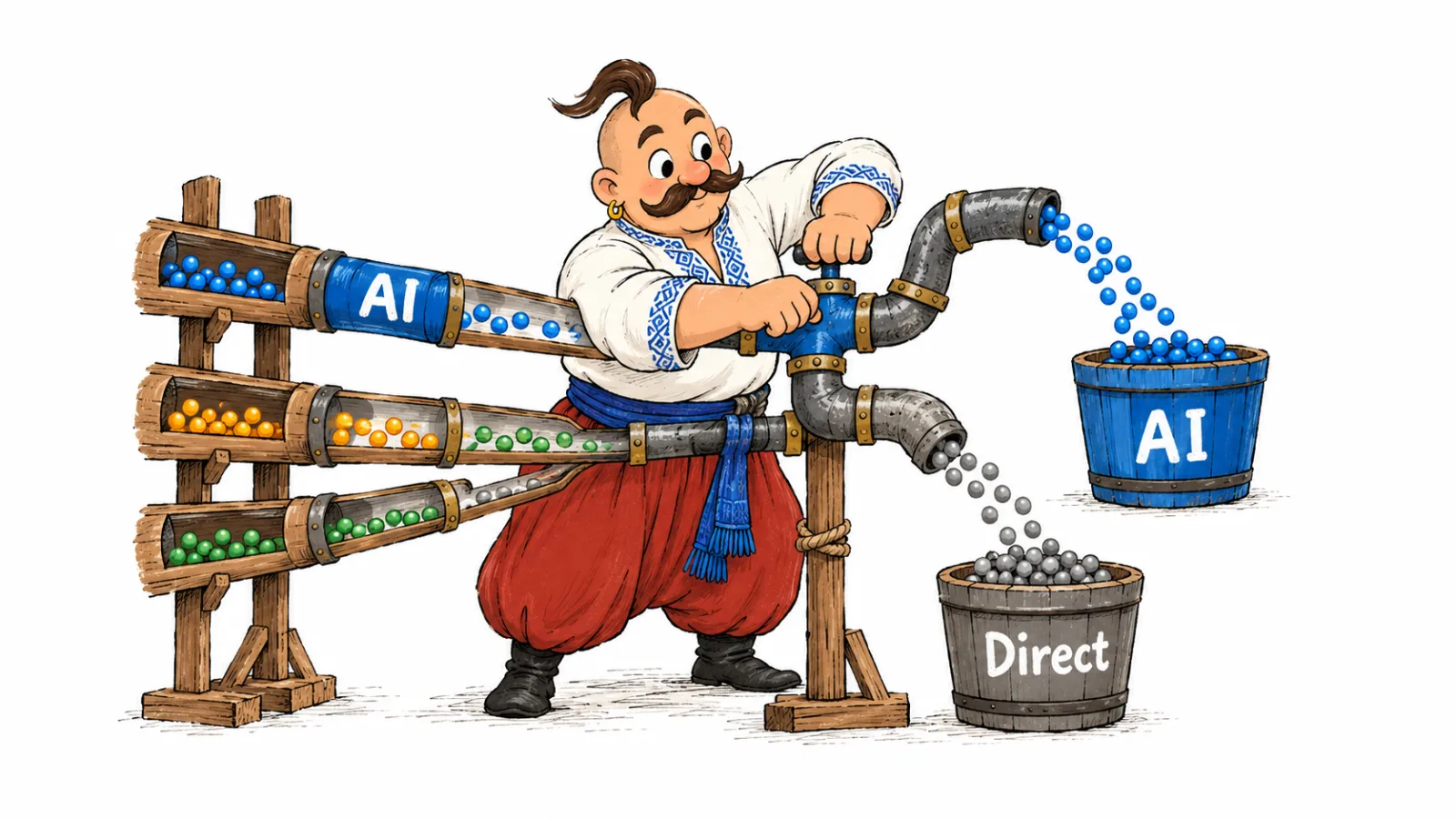

For AI crawler log analysis, download 7 to 30 days of access logs, filter for bot names in the User-Agent, then group requests by bot, URL, status and date. Verify source IPs against the providers' published ranges or their DNS guidance. This shows which agents reached the logged layer and what they requested. It does not show whether an AI answer later cited the page.
How to check AI bot traffic in server logs
- Choose a period, such as the last 7 or 30 days, and keep a copy of the raw access log.
- Find User-Agent values that name known AI bots and count each role separately.
- Group requests by URL, status and day to see which pages were requested and how that changes over time.
- Compare source IPs with published provider ranges. Use the documented DNS check for Google and Apple.
- Classify each agent as a search crawler, training crawler or user-triggered fetcher.
- Compare the result with CDN logs if requests pass through a cache or proxy.
- Check answer mentions separately if you need to know whether an AI system cited a page or brand.
Where to find website access logs
Start with the access log for the web server or platform that receives requests. The format, timezone and retention period matter as much as the file location. If you cannot download raw logs, ask the host administrator for an export that includes timestamps, request paths, status codes, client addresses and User-Agent values.
| Hosting setup | Where to look | What to check |
|---|---|---|
| VPS with Apache | The web server log directory, with the actual path set by the virtual host configuration | The server may use a custom path or log format |
| VPS with Nginx | The file configured with the access_log directive | The administrator may have changed the logged fields |
| cPanel | Raw Access or the domain's downloadable logs | Check whether older rotated files are available |
| Plesk | Domain logs in the panel or files in the subscription directory | Menu names depend on version and account permissions |
| Managed or shared hosting | Ask support for a raw access log export | Specify the period, timezone, rotation and required fields |
| Cloudflare or another CDN | The edge request log; Cloudflare also has AI Crawl Control and Logpush | Edge and origin logs can show different requests |
| Vercel or Netlify | Request logs in the project dashboard or a platform export | Check retention and edge request coverage for your plan |
| WordPress plugin | A plugin report, if it records requests at the application layer | It may miss cached or CDN responses that never reach PHP |
A cached request can finish at the CDN without reaching the origin server. A blocked request may appear at the edge and never reach the origin either. Compare both layers when possible. Cloudflare's AI Crawl Control documentation describes its crawler activity view. For raw request fields, check the Logpush and Logpull datasets documentation. Access and field availability depend on the Cloudflare plan.
Read a server log line
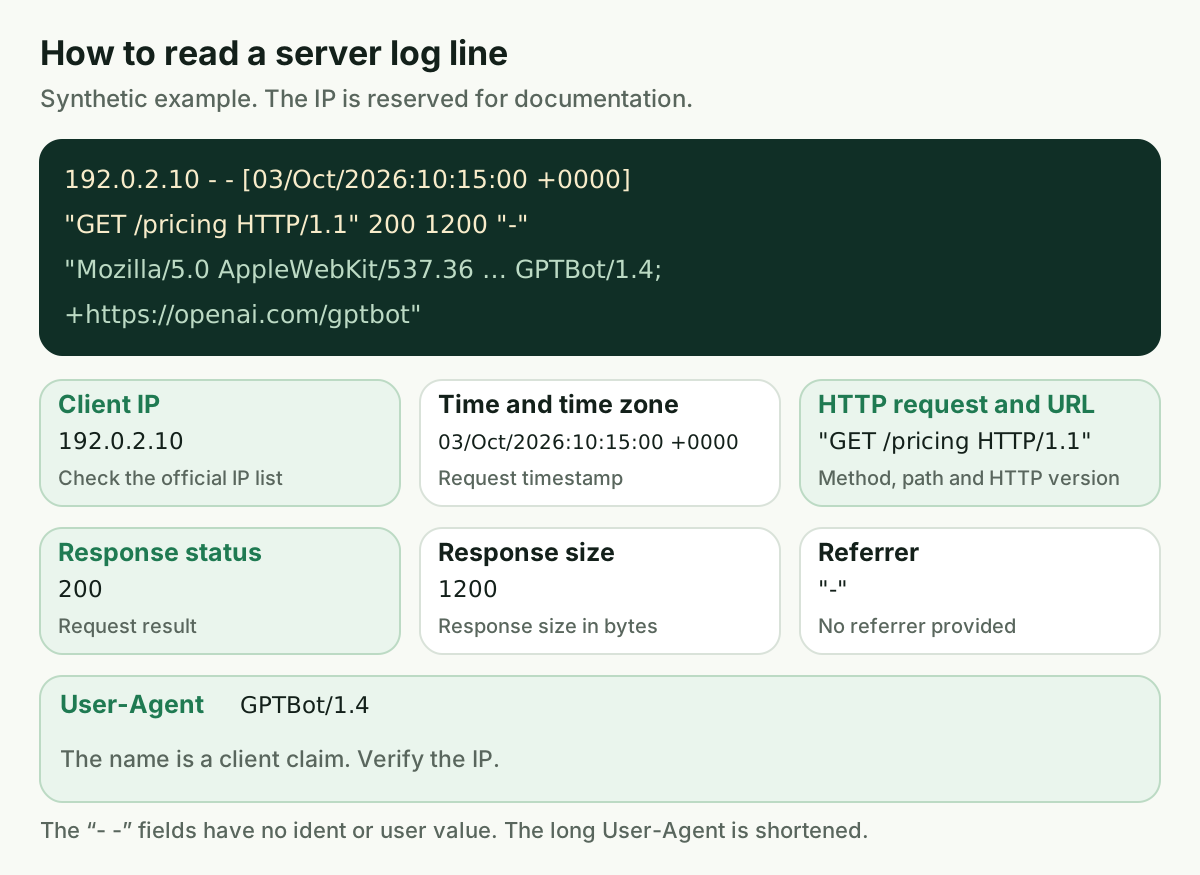
In Apache's combined format, the client address, time, HTTP request, status, response size, referrer and User-Agent occupy predictable positions. This synthetic example uses an IP address reserved for documentation:
192.0.2.10 - - [03/Oct/2026:10:15:00 +0000] "GET /pricing HTTP/1.1" 200 1200 "-" "Mozilla/5.0 AppleWebKit/537.36 (KHTML, like Gecko); compatible; GPTBot/1.4; +https://openai.com/gptbot"
Here, 192.0.2.10 is the client address, the brackets hold the timestamp, GET /pricing gives the method and path, 200 is the response status, and the final quoted value is the User-Agent. Apache documents its combined log fields. Nginx fields depend on the configured log format. JSON logs, proxies and custom layouts put values in different places.
AI bots in server logs and what they do
A User-Agent helps classify a request, but it is a claim made by the client. Check each role against the provider's documentation. Search crawling, training data collection and fetching a page after a person asks an AI system are different events. The role determines how to interpret the visit. See the guide to controlling AI crawlers with robots.txt for access rules.
| User-Agent in the log | Company and role | What matters when reading the log |
|---|---|---|
GPTBot | OpenAI, web crawling for possible model training | It is separate from ChatGPT search; OpenAI publishes a dedicated IP list |
OAI-SearchBot | OpenAI, search features in ChatGPT | Separate it from GPTBot and user-triggered page retrieval |
ChatGPT-User | OpenAI, fetches a page after a user action | This is not routine crawling; robots.txt may not apply |
OAI-AdsBot | OpenAI, checks ad landing pages | Do not count these requests as search crawling |
ClaudeBot | Anthropic, content collection for models | Anthropic says its crawlers honor robots.txt |
Claude-SearchBot | Anthropic, search quality and search features | Its role differs from training collection |
Claude-User | Anthropic, fetches a page at a user's request | Treat it as a fetch, not a general crawl |
PerplexityBot | Perplexity, search indexing | Perplexity distinguishes it from model training collection |
Perplexity-User | Perplexity, fetches a page at a user's request | Perplexity says it generally ignores robots.txt rules |
Googlebot | Google Search, including AI Overviews and AI Mode | These features do not have a separate User-Agent; they use Google's search infrastructure |
Google-CloudVertexBot, GoogleOther | Google, other documented agents for cloud products or research | Check Google's current crawler reference for the specific role |
Google-Extended | A robots.txt control token | It is not an HTTP User-Agent, so it will not appear as a request name |
Applebot | Apple, indexing for Apple search features | Check its IP against Apple's list or use Apple's DNS method |
Applebot-Extended | A token controlling use of content | It is not a separate User-Agent and will not appear as a request name |
Amazonbot, Amzn-SearchBot, Amzn-User | Amazon, collection, search indexing and user-triggered retrieval | Amazon documents separate roles and IP pages |
Meta-ExternalAgent, Meta-WebIndexer, Meta-ExternalFetcher | Meta, collection, indexing and user-triggered retrieval | Meta's crawler documentation describes these agents but does not publish an IP list |
MistralAI-Index, MistralAI-Training, MistralAI-User | Mistral, search index, training collection and user-triggered retrieval | The role depends on the name; IP lists are available for some roles |
DuckAssistBot | DuckDuckGo, crawling for AI-assisted answers | DuckDuckGo publishes a separate address list |
CCBot | Common Crawl, collection for an open web archive used by researchers and AI developers | A request does not identify which model or answer may use the archive; see the Common Crawl FAQ |
bingbot | Microsoft Bing, a search index that can support Copilot answers | Check the published Bing list, not only the User-Agent |
OpenAI's crawler documentation, Anthropic's crawler guidance and Perplexity's crawler documentation describe the different roles and their robots.txt behavior. Google-Extended and Applebot-Extended are control tokens, not agents that send HTTP requests. Google's AI features documentation explains that AI Overviews and AI Mode use regular Google Search crawling and Googlebot.
Find AI bots in server logs
The commands below assume a standard combined access log in the current directory. They count names in the User-Agent, which are client claims rather than verified providers. Filter first, then verify the source IP.
| Question | Command for a combined log |
|---|---|
| Find GPTBot lines | grep -i 'GPTBot' access.log |
| Count GPTBot lines | grep -ic 'GPTBot' access.log |
| Group GPTBot URLs | awk -F'"' '$6 ~ /GPTBot/ { split($2, req, " "); count[req[2]]++ } END { for (url in count) print count[url], url }' access.log |
| Count GPTBot status codes | awk '$9 ~ /^[0-9][0-9][0-9]$/ && /GPTBot/ { count[$9]++ } END { for (status in count) print status, count[status] }' access.log |
| Find robots.txt and llms.txt requests | grep -F '/robots.txt' access.log; grep -F '/llms.txt' access.log |
| Count GPTBot requests by day | awk -F'[][]' '/GPTBot/ { day=substr($2,1,11); count[day]++ } END { for (day in count) print day, count[day] }' access.log |
| Search gzip rotations | zgrep -Ei 'GPTBot' access.log*.gz |
The table gives a quick GPTBot view. The following commands cover more agents and answer common access log questions.
How to find GPTBot in access logs
In combined format, the User-Agent usually appears in the last quoted part of the line. This filter finds rows containing its name. It finds a claim, not proof of source, because any client can send the same text.
grep -i 'GPTBot' access.log
To save requests from known agents for later analysis, filter by User-Agent. This expression includes the listed OpenAI, Anthropic and Perplexity roles, plus other names from the table. It finds claimed names, not verified IPs. Leave out Google-Extended and Applebot-Extended, because neither is an HTTP client name in a User-Agent.
grep -Ei 'GPTBot|OAI-SearchBot|ChatGPT-User|OAI-AdsBot|ClaudeBot|Claude-SearchBot|Claude-User|PerplexityBot|Perplexity-User|Googlebot|Google-CloudVertexBot|GoogleOther|Applebot|Amazonbot|Amzn-SearchBot|Amzn-User|Meta-ExternalAgent|Meta-WebIndexer|Meta-ExternalFetcher|MistralAI-[[:alnum:]-]*|DuckAssistBot|CCBot|bingbot' access.log > ai-bots.log
Count GPTBot requests by day
This example reads dates in [dd/Mon/yyyy:hh:mm:ss] format. The timezone remains in the timestamp, but the command drops the hour. Convert to your site's timezone before comparing with releases or configuration changes if needed.
grep -i 'GPTBot' access.log | awk -F'[][]' '{print substr($2,1,11)}' | sort | uniq -c
The count is lines with a matching name, not unique IPs or successfully delivered pages. If one User-Agent contains two bot names, the multi-name counter below counts that line twice.
grep -Eio 'GPTBot|OAI-SearchBot|ChatGPT-User|ClaudeBot|Claude-SearchBot|Claude-User|PerplexityBot|Perplexity-User|Googlebot|Applebot|Amazonbot|Meta-ExternalAgent|CCBot|bingbot' access.log | sort | uniq -c | sort -nr
Which URLs AI bots request
In combined format, the HTTP request sits between quotation marks. This command takes the path after the method and counts GPTBot lines by URL. A query string remains part of the URL.
grep -i 'GPTBot' access.log | awk -F'"' '{print $2}' | awk '{print $2}' | sort | uniq -c | sort -nr | head -20
Sort the full report by date to investigate a particular spike. For other log formats, use a parser that understands the field layout instead of reusing the same awk fields.
AI crawler response status codes
In a standard whitespace representation of a combined log line, the response code is field nine. This position only applies to that format and configuration.
grep -i 'GPTBot' access.log | awk '{print $9}' | sort | uniq -c | sort -nr
A 200 response means the request succeeded at the HTTP level, but does not confirm useful page content. A 301 or 302 redirects the client. A 304 allows the client to use its cached copy. A 403 or 429 indicates a denial or limit, while repeated 5xx responses point to server errors. Check the destination and response body before deciding whether the page was accessible.
Requests for robots.txt and llms.txt
Filter these files separately. This command includes GET and HEAD requests and possible query parameters. A matching row records a request for the URL; it does not show how the client processed the file.
grep -Ei '"(GET|HEAD) /(robots\.txt|llms\.txt)([? ]|$)' access.log | awk -F'"' '{print $1 " " $2 " " $3}'
This answers what appears in the log. Checking whether a specific crawler may access a specific page is a different task. See the guide to creating an llms.txt file and the separate robots.txt guide.
For compressed gzip rotations, zgrep searches archived logs with the same matching logic:
zgrep -Ei 'GPTBot|OAI-SearchBot|ChatGPT-User|ClaudeBot|Claude-SearchBot|Claude-User|PerplexityBot|Perplexity-User' access.log*.gz
Check the filename pattern used by your host. Rotated files often hold earlier days, so searching only the current access.log can truncate the period and distort a trend.
Verify AI crawler IP addresses
Do not treat a User-Agent as proof of identity. Extract unique addresses for each bot, compare them with the provider's current list and label the result verified, not verified or no published list. An address missing from a list does not by itself prove malicious activity.
| Company | IP list or verification method | How to read the result |
|---|---|---|
| OpenAI | https://openai.com/gptbot.json; https://openai.com/searchbot.json; https://openai.com/chatgpt-user.json; https://openai.com/adsbot.json | Each file has creationTime and prefixes with ipv4Prefix and, where available, ipv6Prefix |
| Anthropic | https://claude.com/crawling/bots.json | JSON has creationTime and a prefixes array with ipv4Prefix |
| Perplexity | https://www.perplexity.com/perplexitybot.json; https://www.perplexity.com/perplexity-user.json | JSON has creationTime and a prefixes array with ipv4Prefix |
| Google, automated crawlers | https://developers.google.com/static/crawling/ipranges/common-crawlers.json | prefixes contains ipv4Prefix and ipv6Prefix; compare the address with this list |
| Google, user-triggered requests | https://developers.google.com/static/crawling/ipranges/user-triggered-fetchers.json; https://developers.google.com/static/crawling/ipranges/user-triggered-fetchers-google.json; https://developers.google.com/static/crawling/ipranges/user-triggered-agents.json | These are separate fetcher lists; do not check a user-triggered agent only against common crawlers |
| Apple | https://search.developer.apple.com/applebot.json | JSON has creationTime and prefixes with ipv4Prefix; Apple's documentation also describes reverse and forward DNS |
| Amazon | https://developer.amazon.com/amazonbot/ip-addresses/; https://developer.amazon.com/amazonbot/searchbot-ip-addresses/; https://developer.amazon.com/amazonbot/live-ip-addresses/ | These are HTML pages with embedded JSON containing prefixes; copy the JSON into a file before checking it. Some ipv4Prefix values are single IPs without a mask |
| Meta | Meta's crawler documentation does not publish an IP list for these agents | Mark the list as unpublished; a User-Agent match is not enough |
| Mistral | https://mistral.ai/mistralai-user-ips.json; https://mistral.ai/mistralai-index-ips.json | Both JSON files have creationTime and prefixes with ipv4Prefix; no list was found for MistralAI-Training |
| DuckDuckGo | https://duckduckgo.com/duckassistbot.json | JSON has creationTime and a prefixes array with ipv4Prefix |
| Microsoft Bing | https://www.bing.com/toolbox/bingbot.json | Compare with the published JSON, not only with the User-Agent |
| Common Crawl | The Common Crawl FAQ does not list a separate IP list for CCBot | Mark the list as unpublished |
The JSON lists checked here use a prefixes array with keys such as ipv4Prefix and ipv6Prefix. The script below accepts both. Python's ipaddress module also accepts a single address without a CIDR mask. Providers can change file formats, so treat this as a starting point and check the provider's documentation before relying on it regularly.
Extract unique addresses for one bot:
grep -i 'GPTBot' access.log | awk '{print $1}' | sort -u > gptbot-ips.txt
Save this script as verify_ips.py. It reads an IP file as the first argument, a JSON prefix list as the second and prints a status for every address:
import ipaddress
import json
import sys

if len(sys.argv) != 3:
    raise SystemExit("Usage: python3 verify_ips.py IP_FILE RANGES_JSON")
with open(sys.argv[1], encoding="utf-8") as f:
    addresses = [line.strip() for line in f if line.strip()]
with open(sys.argv[2], encoding="utf-8") as f:
    data = json.load(f)
networks = []
for item in data.get("prefixes", []):
    for key in ("ipv4Prefix", "ipv6Prefix"):
        if key in item:
            networks.append(ipaddress.ip_network(item[key], strict=False))
if not networks:
    raise SystemExit("No prefixes found in the JSON file")
for address in addresses:
    ip = ipaddress.ip_address(address)
    result = "verified" if any(ip in network for network in networks) else "not in list"
    print(f"{ip}: {result}")
For example, run python3 verify_ips.py gptbot-ips.txt openai-gptbot.json. This is a starting point for JSON files with prefixes, not a universal parser for future formats.
For Google and Apple, check reverse DNS and then confirm that a forward lookup of the returned hostname resolves to the same IP. Set the address from the log in the first command and replace the hostname in the second with the PTR result:
dig +short -x "$ip"
dig +short "<hostname-from-ptr>"
For Google, compare the hostname with the official domain for that crawler type. Apple's hostname must end in .applebot.apple.com. The forward lookup must return the original IP. A PTR result alone is not sufficient. Google's request verification documentation describes this process.
If the site uses a proxy, the address in the origin log may belong to the CDN. Do not trust an arbitrary X-Forwarded-For value. Accept it only from a trusted proxy configured by the server administrator. For one suspicious request or a page access check, see the separate guide to checking AI crawler access to a page.
ChatGPT-User requests in server logs
ChatGPT-User marks a page fetch after a person takes an action in ChatGPT, not routine crawling of an entire site. The same broad role is performed by Claude-User, Perplexity-User, Meta-ExternalFetcher, MistralAI-User and Amzn-User. Their policies differ. OpenAI says robots.txt may not apply to ChatGPT-User, Perplexity says Perplexity-User generally ignores those rules, and Anthropic says its crawlers honor them. Meta's documentation says Meta-ExternalFetcher may bypass robots.txt. Amazon says Amzn-User may not follow every robots.txt directive.
Such a log line supports a limited conclusion: at the recorded time, an agent fetched or tried to fetch a specific URL following an action in its interface. It does not identify the person, reveal their prompt or prove that the page appeared in the final answer. Across Cloudflare's network, user-action crawling increased by more than 15 times in 2025, and Cloudflare closely linked that growth to ChatGPT-User traffic. This is a network-wide observation for that year, not a benchmark for an individual site, as explained in Cloudflare Radar's 2025 year in review. For your own domain, check how often these requests occur and what status the requested pages return.
How often does GPTBot visit a website
There is no universal visit frequency. It varies with the size and update schedule of a site, bot role, page availability, sitemap, rate limits and the layer that writes the log. Build a baseline from your own weekly data and compare equivalent days and hosts.
How to analyze AI crawler logs over time
For a weekly comparison, print the day and matched agent for each line, then group identical pairs:
awk -F'"' '{ ua=$6; if (match(ua, /GPTBot|OAI-SearchBot|OAI-AdsBot|ChatGPT-User|ClaudeBot|Claude-SearchBot|Claude-User|PerplexityBot|Perplexity-User|Googlebot|Google-CloudVertexBot|GoogleOther|Applebot|Amazonbot|Amzn-SearchBot|Amzn-User|Meta-ExternalAgent|Meta-WebIndexer|Meta-ExternalFetcher|MistralAI-(User|Index|Training)|DuckAssistBot|CCBot|bingbot/)) { bot=substr(ua,RSTART,RLENGTH); day=substr($1,index($1,"[")+1,11); print day, bot } }' access.log | sort | uniq -c
This produces a daily view in the log's timezone. To compare weeks, aggregate days by ISO week and year rather than adding the same week number across different years. Compare like with like: request volume by role, distinct URLs, error share and first-time URLs.
| Metric | How to calculate it | What it shows |
|---|---|---|
| Requests per role per week | Add daily counts for agents with the same role and ISO week | Changes in search, training and user-triggered fetch activity |
| Unique URLs per bot | Deduplicate paths for each User-Agent within the week | How widely the bot crawled, apart from repeat requests |
| Share of non-200 responses per bot | non-200 status count / all bot requests × 100% for the week | Frequency of redirects, denials, limits and server errors |
| URLs requested for the first time | Compare the week's URL set with URLs in earlier logs | Newly observed pages in the crawl |
| URLs with user-fetch requests | Filter ChatGPT-User, Claude-User and Perplexity-User, then collect unique paths | Pages fetched after user actions |
This comparison can show that new pages started receiving search requests or that denials increased after an access rule changed. Cloudflare Radar reported that, across its network, AI bots other than Googlebot accounted for an average of 4.2% of HTML requests in 2025, while Googlebot alone accounted for 4.5%. These are network averages for that year, not a forecast or target for an individual site.
Record the timezone and hostname with each report. A spike at the edge with no change in the origin log may be caused by caching or a block before the application. Note when you change a sitemap or robots.txt. Assess visit frequency against your own baseline, not another site's count.
What logs show and what they cannot show
A log line supports a conclusion only when read with its source, URL, status and logging layer. Use the table to choose a next check without extending the conclusion beyond the evidence.
| What you see | What it supports | What it does not prove | What to check next |
|---|---|---|---|
A verified OAI-SearchBot received a 200 for a page | The request reached the logged layer and the server returned success | That the page entered an index or a ChatGPT answer | Check the URL, response body and answer visibility separately |
ChatGPT-User requested one URL | A page was requested during an action in ChatGPT | That it was cited or which prompt triggered the fetch | Check whether the URL appears among cited sources for related prompts in answer monitoring, and whether it returned 200 with full content |
| GPTBot received 403 or 429 | The server or protection layer denied or limited that request | That the configuration is necessarily wrong or all other agents are blocked | Compare the CDN log, access rule and repeated requests |
| Many 404s from AI agents | The requested paths were not found at this layer | That the agent just found broken links or the whole section is unavailable | Check old URLs, redirects, routes and where the paths came from |
| A chain of 301 or 302 responses | The client received one or more redirects | That it followed through to the canonical page | Check the final URL and the last response status |
| A 304 response | The server said the resource had not changed for a conditional request | That this line contains a full page body | Account for caching and the previous successful response |
| Googlebot appears but no other AI User-Agents do | Googlebot appeared in the visible log for that period | That other services do not use the site or Google AI has a separate agent | Check the period, CDN and Google Search Console |
| No bots appear at origin, but Cloudflare shows them | The edge recorded requests missing from the origin log | That a request reached the application or received an origin response | Compare edge status and cache action |
A request for llms.txt appears | A client requested the file | That the client read it or that it affected an answer | Check User-Agent, status and file contents without inferring citation impact |
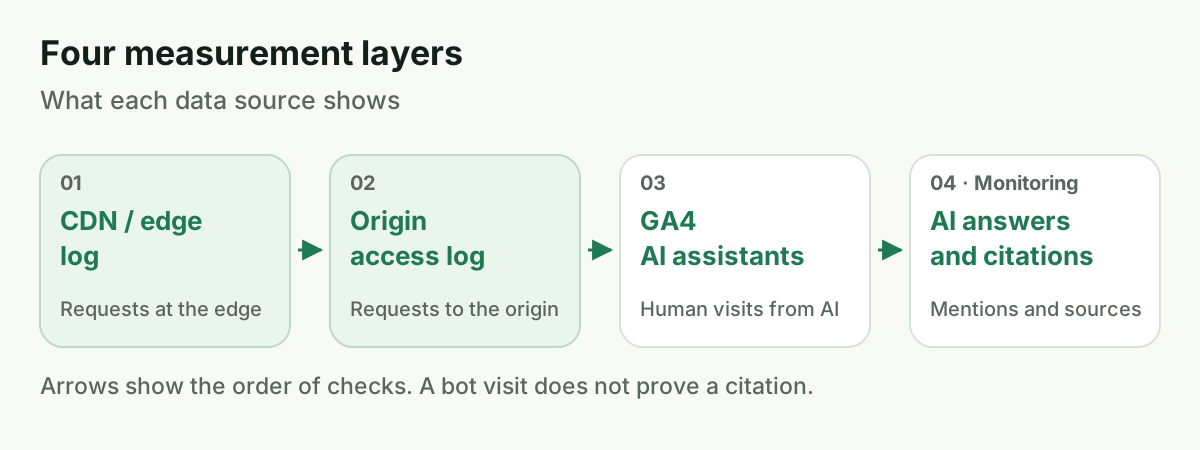
Each layer answers a different question. The edge sees CDN requests, an access log records requests at the server layer, GA4 counts human visits from AI assistants, and answer monitoring shows mentions and sources. For human referrals, see AI visibility metrics alongside SEO. To see which pages AI answers cite, read how to analyze the sources AI relies on.
A server log also does not show whether a client executed JavaScript. In a limited sample of sites, Vercel and MERJ found that major AI crawlers did not execute JavaScript; they published the study in December 2024. That finding describes the sample and period, not every current agent or site.
How to track AI bots on a website regularly
The right tool depends on log volume, format and whether you need a recurring report. Start with the raw log so you know which events the analysis includes.
| Tool | When it fits | Limitation |
|---|---|---|
grep, awk, zgrep | One-time checks or small logs with a known format | These commands assume combined layout and need adaptation for JSON |
| GoAccess | A quick overview and reports for common web log formats | Check that it recognizes User-Agent fields and timezone correctly |
| Screaming Frog Log File Analyser | URL and bot activity analysis in web logs | Check current license terms, import limits and format support with the vendor |
| Cloudflare AI Crawl Control | AI crawler activity on sites using Cloudflare | These are edge-level data; a failed request does not automatically mean it was blocked |
| ELK, OpenSearch or BigQuery | Large logs, recurring aggregates and dashboards | Requires ingestion, a field schema and query maintenance |
For an active site, a weekly review is a reasonable starting point. A site that changes less often may only need a monthly review. Compare outside the normal cadence after changing robots.txt, a WAF, CDN or logging setup. This is a process recommendation, not an industry standard.
Logs can contain IP addresses and URLs that relate to identifiable people in context. Recital 30 of the GDPR recognizes IP addresses as online identifiers that may be personal data. Restrict access to raw files, keep only the period you need and set retention according to your organization's policy.
Common mistakes
- Searching for
Google-ExtendedorApplebot-Extendedas User-Agents and assuming search crawlers disappeared. These are control tokens, not request agents. - Trusting a User-Agent without checking the IP. Any client can send the same name.
- Looking only at the origin log when a CDN, cache or edge block is in front. Some requests may finish earlier.
- Calling a visit a citation. A server log does not contain the model's final answer.
- Expecting a robots.txt block to stop
ChatGPT-User. Rules for user-triggered fetches depend on the provider and agent. - Comparing periods in different timezones or ignoring rotated
.gzfiles. - Drawing a conclusion from one spike without checking URL changes, sitemap, access rules and log coverage.
Frequently Asked Questions
How to see if GPTBot crawls my site?
Run grep -i 'GPTBot' access.log, group the lines by date and URL, then compare the source IP with OpenAI's current GPTBot list. A User-Agent match alone does not verify the request.
How often does GPTBot visit a website?
There is no general schedule for every website. Count requests and unique URLs by week, separate agents by role and compare periods with the same logging setup.
What do ChatGPT-User requests in server logs mean?
They indicate that a page was fetched after a user action in ChatGPT. The line does not reveal the question or prove that the URL was cited in an answer.
How do I verify AI crawler IP addresses?
Compare an address with the provider's current JSON list. If the site uses a proxy, first establish whether the logged address belongs to the visitor or the proxy.
Does a GPTBot visit mean ChatGPT cites the page?
No. GPTBot is separate from the search-focused OAI-SearchBot. Even a verified search request does not show that a page appeared in a particular answer.
Why is Google-Extended missing from server logs?
Google-Extended is a robots.txt control token, not an HTTP bot name. Google Search requests, including AI Overviews and AI Mode, may come from Googlebot.
How we do it in VYDAI
VYDAI does not read server logs. The GEO audit sends test requests with selected bot User-Agents, including GPTBot, OAI-SearchBot, ClaudeBot, Claude-SearchBot, Claude-User, PerplexityBot and Perplexity-User, then shows how the site responded. It checks current page access, not visit history. See the VYDAI GEO audit for the available checks.

Separately, VYDAI uses GA4 data for human visits from AI assistants. Answer monitoring shows whether ChatGPT, Gemini, Claude, Google AI Overviews and AI Mode mention a brand and which sources appear in their answers. Open the VYDAI demo or register to explore those reports.
For AI crawler log analysis, use server logs to answer whether a bot came and what it received. VYDAI answers whether the brand ended up in AI responses and which sources those answers cite.