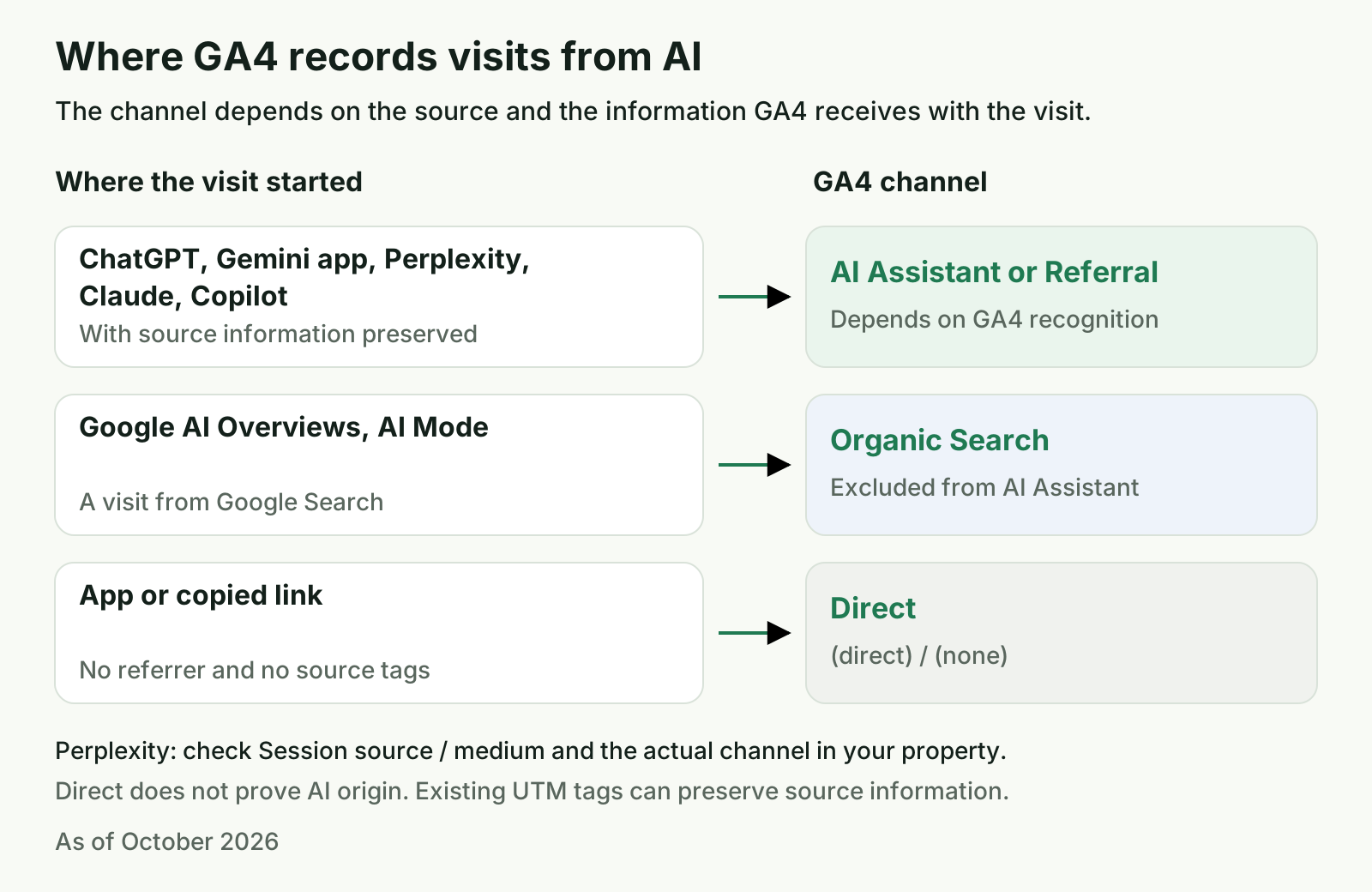
To track ChatGPT traffic in GA4, start with the AI Assistant channel in Traffic acquisition (Reports → Acquisition → Traffic acquisition). Google added it to the default channel group on May 13, 2026. Check that channel first, then add a custom channel group if you need Perplexity, a platform-by-platform breakdown, or your own source list. That is how to track AI traffic in GA4 without starting with a catch-all regex. Clicks from AI Overviews and AI Mode stay in Organic Search. Visits with no referrer can land in Direct, where GA4 cannot identify the AI source from that information alone.
The AI Assistant channel in GA4: what it counts without setup
The AI Assistant channel in GA4 groups sessions whose source Google recognizes as an AI assistant. Google announced the channel in its May 13, 2026 release notes. When a referrer matches a recognized assistant, Analytics assigns the ai-assistant medium, the (ai-assistant) campaign, and the AI Assistant channel. No setup is required to receive this classification.
The release note names ChatGPT, Gemini, and Claude as examples. Google's Default channel group documentation also lists DeepSeek, Copilot, and Grok. Those examples are not a complete domain directory, and they do not guarantee that every visit from every app will be recognized. Perplexity is not named in the default channel definition, so check the data in your own property and add a custom rule if needed.
| GA4 dimension | Typical value for a recognized AI visit | Where to use it |
|---|---|---|
| Session default channel group | AI Assistant | Acquisition / Traffic acquisition |
| Session medium | ai-assistant | Verify classification or build a custom group condition |
| Session campaign | (ai-assistant) | Cross-check traffic recognized natively |
| Session source | A source such as chatgpt.com | Break traffic out by platform and verify domains |
A custom group is useful when you need Perplexity, individual assistant rows, or sources that Google did not classify as AI Assistant. A small site may need only the native channel and a report broken down by Session source. A custom channel gives you control over the rules, but it cannot restore data that GA4 never received.
How to see ChatGPT traffic in GA4 in five minutes
Start with the standard report. It shows how many sessions GA4 has already assigned to AI Assistant or recorded under a ChatGPT source.
- In GA4, open Reports → Acquisition → Traffic acquisition.
- Change the primary dimension to
Session default channel groupto check the native category. Look forAI Assistant. - To inspect a specific assistant, choose
Session source / mediumorSession source, then search forchatgptabove the table. - Add a comparison with another period or platform if you want to review a change over time.
- Review Sessions, Engaged sessions, Engagement rate, and Key events. If ecommerce is configured, also check Transactions and Total revenue.
The Session source / medium row may appear as chatgpt.com / ai-assistant, while another assistant may appear with the usual referral medium. The value depends on the data Analytics received and how it classified it. If you do not see a row, that alone does not prove nobody came from ChatGPT. Check the native channel, actual source values, and your custom group.
How to create a custom channel group for AI traffic in GA4
A custom channel group gives AI visits their own row in reports and lets you include sources that are missing from the default category. Copy the default group first so its other channels remain available, then use the source domain or native medium in your new rule. Google's guide to custom channel groups covers the setup.
- Open Admin → Data display → Channel groups.
- Select Create new channel group. Copy the Default channel group and name the copy, for example
AI traffic and default channels. - Add a channel called
AI assistants. - Create two OR conditions:
Session sourcematches regex from the next section, orSession mediumexactly matchesai-assistant. The second condition includes sessions that GA4 already classified natively, even if their source is not in your domain list. - Move
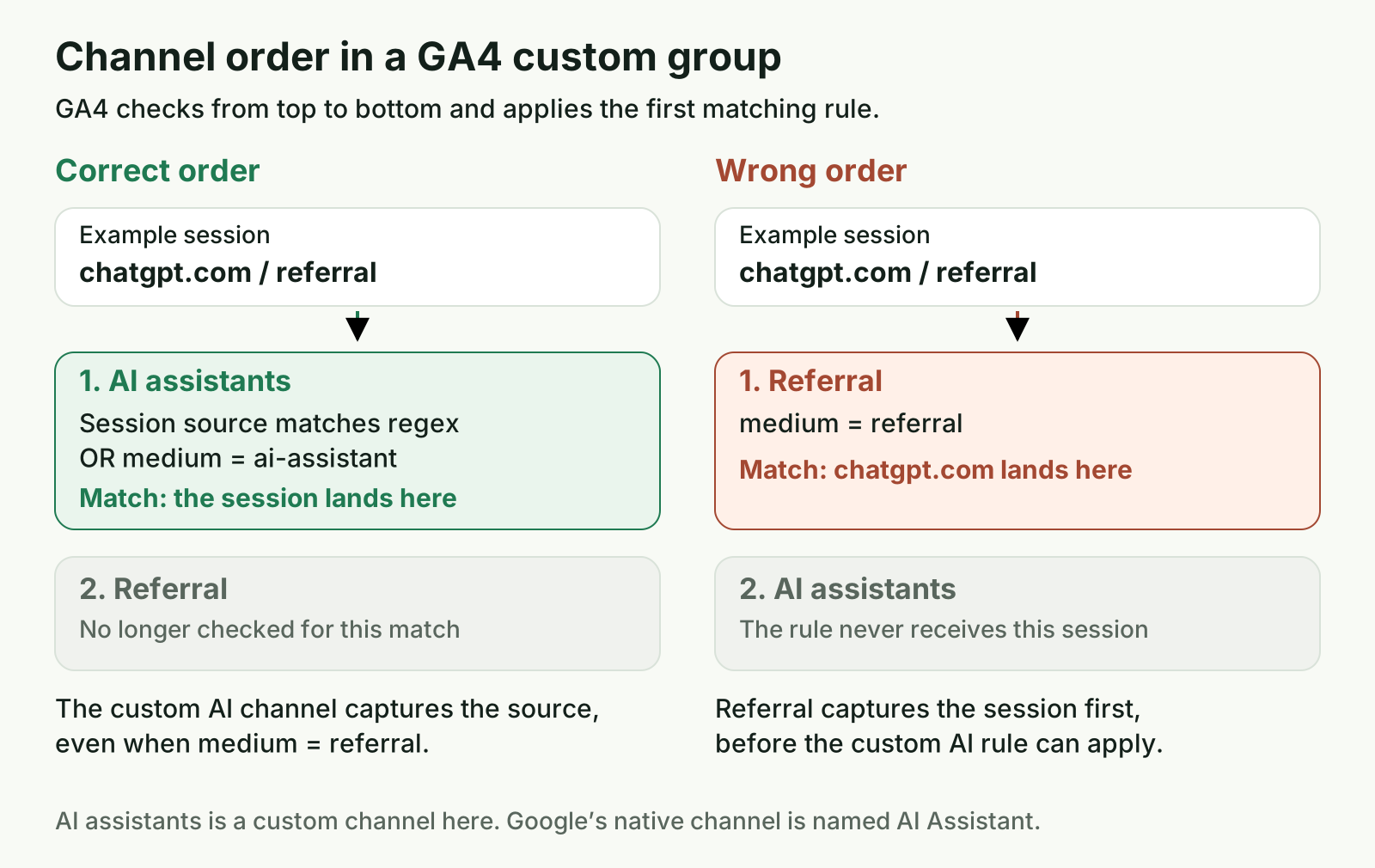
AI assistantsaboveReferraland any other channel that could match the same sessions. - Save the group. Select it as a primary or secondary dimension in Traffic acquisition.
As of October 2026, a standard GA4 property can have two additional custom channel groups; an Analytics 360 property can have five. Each group can have up to 50 channels. You need the Editor role at the property level to create or edit a group. If you only have Viewer access, ask an editor to create it. Existing reports or explorations may still be available to you, depending on your permissions.
Changes to a custom channel group definition apply retroactively in reports and explorations that use it. This does not mean every connected feature is recalculated in the same way: changing audience conditions affects eligibility going forward, not retroactively. The primary channel group is also different from a custom group. When you set a custom group as primary, its criteria populate that dimension from that point onward.
A GA4 regex for ChatGPT, Perplexity, and Gemini
For the Session source → matches regex condition, include the domains you want to count. This expression covers ChatGPT, Perplexity, Gemini, and several other widely used AI services:
^(www\.)?(chatgpt\.com|chat\.openai\.com|perplexity\.ai|gemini\.google\.com|bard\.google\.com|copilot\.microsoft\.com|copilot\.com|edgeservices\.bing\.com|claude\.ai|deepseek\.com|chat\.deepseek\.com|grok\.com|grok\.x\.com|meta\.ai|chat\.mistral\.ai|mistral\.ai|you\.com|phind\.com|poe\.com|kagi\.com|search\.brave\.com)$
| Service | Domain in the regex | Named by Google as a default AI Assistant example? | Note |
|---|---|---|---|
| ChatGPT | chatgpt.com, chat.openai.com | Yes | OpenAI says ChatGPT Search adds utm_source=chatgpt.com to referral URLs |
| Perplexity | perplexity.ai | No | Check actual source values; Google includes it in its custom AI assistant example |
| Gemini | gemini.google.com, bard.google.com | Yes | Keep Gemini assistant traffic separate from AI Overviews and AI Mode in Search |
| Microsoft Copilot | copilot.microsoft.com, copilot.com, edgeservices.bing.com | Yes | Add other domains only after checking your reports |
| Claude | claude.ai | Yes in the release notes; not named in the channel definition | Add it if you want it alongside the other sources |
| DeepSeek, Grok | deepseek.com, chat.deepseek.com, grok.com, grok.x.com | DeepSeek and Grok are named in the default channel help page | Domains may differ across product surfaces |
| Other services | meta.ai, chat.mistral.ai, mistral.ai, you.com, phind.com, poe.com, kagi.com, search.brave.com | Not all are named by Google | Keep the sources you need and update the expression from your own GA4 data |
GA4 uses RE2, and regex matching is full-match and case-sensitive by default. Use the complete domain, escape periods, and keep the ^ and $ boundaries. Google's Analytics regex documentation explains these defaults. OpenAI also says that ChatGPT Search automatically adds utm_source=chatgpt.com to referral URLs in its Publishers and Developers FAQ. That helps identify those search referrals; it does not prove that the parameter is present in every client or situation.
After creating the group, inspect actual Session source values in your report. Keep only the domains you need. copilot.com, chat.deepseek.com, and other less common variants are candidates to verify in your own data, not a guarantee that every visit sends that referrer.
Why channel order and regex precision matter
GA4 stops at the first matching channel.
If Referral is above AI assistants, a session from an AI site with the referral medium is assigned to Referral before GA4 checks your rule. Put the AI channel first.
Google's help page includes a broad example with fragments such as .*ai, .*gpt.*, and .*google.*. That can match unrelated sources containing those character sequences, including a Google property that is not Gemini. The expression above matches a full domain, so an arbitrary source such as blog.example-ai does not match merely because its name contains ai.
Where Perplexity and Gemini traffic shows up in GA4
How to track Perplexity referrals in GA4
In Traffic acquisition, search Session source for perplexity.ai or the value present in your own property. Since Perplexity is not named in Google's default AI Assistant examples, its sessions may stay under Referral. Add the source to a custom group if you want it consistently included in your own AI channel.
How to track Gemini traffic in GA4
Check which Google surface sent the visit. A link from the Gemini app may have gemini.google.com as its source if Analytics received the referrer. Google AI Overviews and AI Mode appear within Google Search. GA4 does not put them in AI Assistant: clicks from organic Google results belong to Organic Search. Search Console includes those impressions and clicks in the Web search type, not in separate AI Overviews or AI Mode metrics. See Google Search Central's guidance on AI features.
| Surface or scenario | What GA4 typically records | Can GA4 separate it? |
|---|---|---|
| ChatGPT with a recognized referrer | AI Assistant, ai-assistant, or a source such as chatgpt.com | Yes, by channel or Session source |
ChatGPT Search with utm_source=chatgpt.com | The source and campaign passed in the URL | Yes, check Session source and Session campaign |
| Gemini app | Gemini referrer, if sent and retained | Yes, by source or custom group |
| Perplexity | perplexity.ai as source, if sent | Yes, add it to a custom group if needed |
| Claude or Copilot | Recognized AI Assistant or a specific Session source | Check both dimensions and your actual property values |
| Google AI Overviews and AI Mode | Google organic search | No, they do not have a separate AI Assistant channel |
| Visit without a referrer or UTM | Direct or another value from the available data | No, Direct alone cannot identify the AI service |
For more on measuring Google AI Overviews and AI Mode, see how to appear in Google AI Overviews and AI Mode. That article covers visibility in Google Search; this guide separates it from referrals from AI assistants.
How to see landing pages from AI traffic in GA4 and measure conversions
Open Explore and create a Free form report. Add Landing page + query string to Rows, then create a filter or session segment using Session default channel group, Session source, or your custom group. Add Sessions, Engaged sessions, Engagement rate, Key events, and Session key event rate as values. For an online store, you can also include Transactions and Total revenue.
Compare these landing pages with pages cited by AI systems. The article on which website pages ChatGPT cites explains how to review the pages that appear as sources in AI answers.
How to track AI conversions in GA4
For the same landing page and date range, compare Session key event rate in the AI channel with Organic Search. This shows where the share of sessions with a key event is higher without comparing pages with different goals. For ecommerce context, how ChatGPT selects products for ecommerce explains how ChatGPT picks products and what a store can prepare.
Your measured AI share is the number of sessions in your AI channel divided by all sessions for the same period. This is the share classified by your report, not an estimate of everyone influenced by AI answers.
Keep Exploration limits in mind. The default retention period for detailed data is two months; a standard property can extend it to 14 months. Reports and explorations can hide rows because of privacy thresholds, and queries with more than 10 million events may use sampled data. Data from the most recent 48 hours can differ while processing completes. Avoid conclusions from an incomplete current day.
Why is ChatGPT traffic showing as direct in GA4?
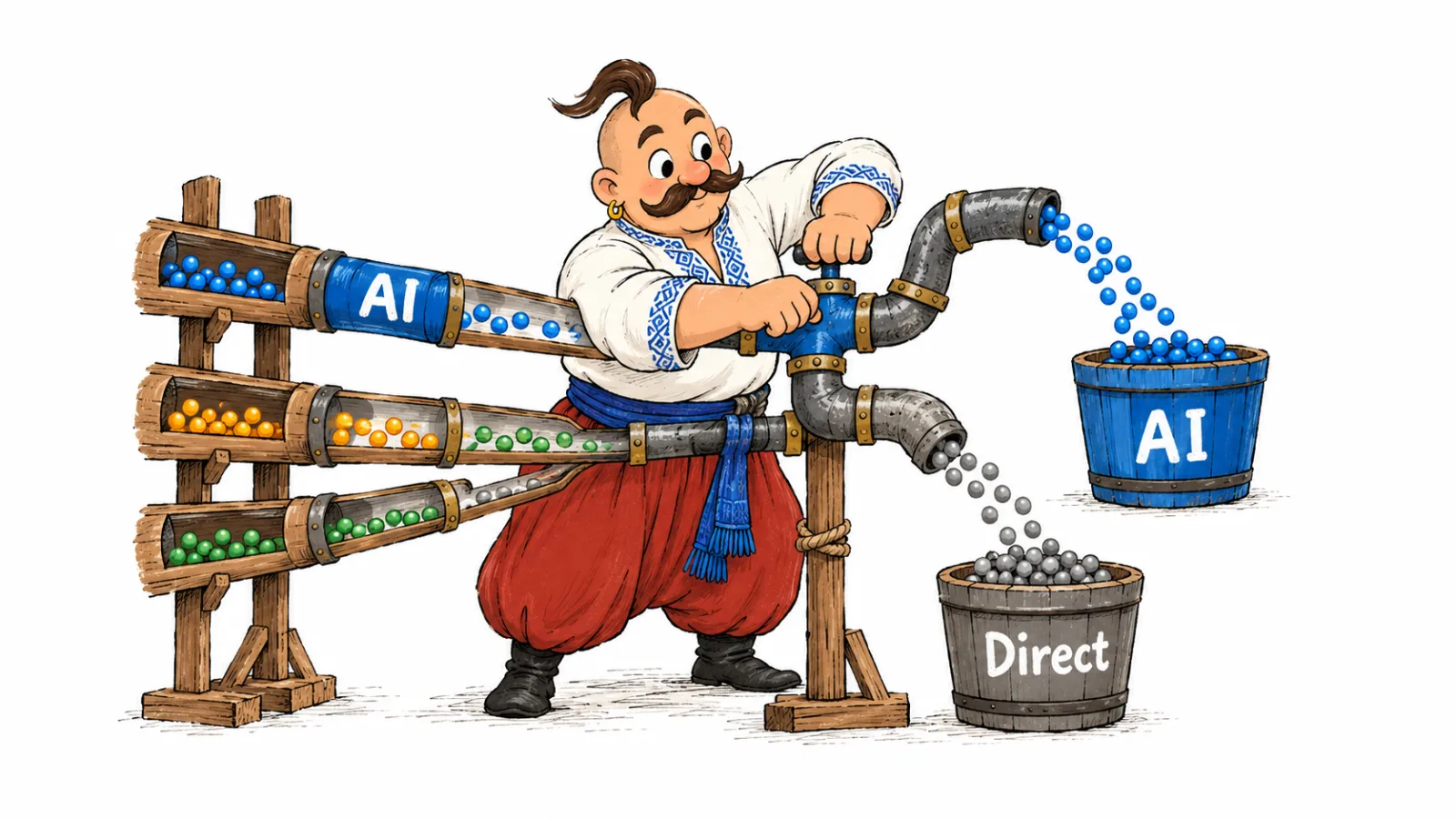
Direct means Analytics did not identify another source from the signals it received. This can happen when someone opens a saved link or types a URL, or when a referrer or campaign parameters are not preserved during a visit. A report does not identify the exact cause of every Direct session.
If a browser or app did not send a referrer, a regex has no value such as chatgpt.com, gemini.google.com, or perplexity.ai to identify the service.
Do not label all Direct sessions as AI traffic.
If ChatGPT traffic keeps showing as Direct while the AI Assistant channel stays flat, that pattern alone still does not prove an AI origin. Use the native AI Assistant and custom group as the measurable part of referrals, then review citations and mentions separately. How to analyze the sources AI relies on can help connect cited links with the pages people visit.
You can add UTM parameters to links you control, following GA4's tagging guidance. This works for your own links, such as a profile or newsletter link, but it does not add a tag to third-party links in ChatGPT, Gemini, or Perplexity answers.
What GA4 will not show
GA4 reports visits and on-site behavior after a click, but it does not include the prompt someone entered in an AI assistant. A Google Analytics Community answer also says standard analytics cannot show which prompts drove those visits and suggests analyzing sources and site pages instead.
Session source and page referrer contain source or previous-URL information, not the text of a conversation. GA4 also cannot count a brand mention or citation when nobody clicks through to the site. That requires a separate way to monitor AI answers. The article on measuring AI visibility alongside SEO separates mentions, citations, and visits.
GA4 does not show AI Overviews or AI Mode as separate subchannels of organic search. Search Console includes their results in Web performance data. Keep those clicks separate from traffic from the Gemini app: they are different Google surfaces.
Common mistakes when setting up AI traffic
| Mistake | What you will see | How to fix it |
|---|---|---|
Use only a Session source regex without an OR condition where Session medium exactly matches ai-assistant | Sessions GA4 recognized natively from a domain outside your list may be assigned to another channel | Add a second OR condition: Session medium exactly matches ai-assistant |
Use chatgpt.com without escaping the period | In regex, a period means any character | Write chatgpt\.com and check the full expression against sample values |
Assume chatgpt is a partial match by default | GA4 regex matching is full-match and case-sensitive by default, so chatgpt alone will not match chatgpt.com | Use the full domain or deliberately build a partial-match condition |
Use broad strings such as .*google.* or .*gpt.* | Unrelated sources containing that fragment can enter the channel | Match complete domains with ^ and $ |
| Put the AI channel below Referral | The session is assigned to the first matching rule, often Referral | Move the AI channel above Referral |
| Expect an audience to backfill | New audience conditions do not change historical eligibility | Use the custom group in reports for a retrospective view; audience rules apply going forward |
| Look for custom channel groups in BigQuery Export | The export schema has no ready-made custom channel group dimension | Recreate the classification rule in your SQL query |
| Treat Direct as hidden AI traffic | The report includes unverified visits | Keep Direct separate and count only sessions with a recognized source or medium |
Looker Studio and BigQuery: when the GA4 interface is not enough
Looker Studio can put GA4 and Search Console data in the same dashboard. For example, show organic Google Search clicks from Search Console beside sessions, engaged sessions, or conversions from GA4. Those totals will not match: Search Console counts clicks on Google results, while Analytics counts site sessions using its own measurement and attribution rules.
BigQuery is useful when you need SQL analysis or your own storage for detailed data. However, custom channel groups are not included in the GA4 BigQuery Export Schema. Recreate the rules in your query using available session sources and UTM parameters. Document the regex in the query so updates to your source list do not drift from GA4 reporting.
Frequently Asked Questions
What is the AI Assistant channel in GA4?
It is the default channel for sessions GA4 recognizes as traffic from AI assistants. As of October 2026, those sources use the ai-assistant medium and (ai-assistant) campaign. Google lists ChatGPT, Gemini, DeepSeek, Copilot, and Grok as examples.
Can GA4 show ChatGPT prompts? No. GA4 can show the referral source, session, and landing page, but standard dimensions do not contain the prompt or conversation text.
Do AI Overviews and AI Mode appear in the AI Assistant channel? No. Google explicitly excludes them from AI Assistant. Organic clicks from Google Search are counted as Organic Search in GA4, and Search Console includes them in the Web search type.
Will creating a new channel group change historical reports? Yes, a custom channel group can be used retrospectively in supported reports and explorations. Audience rule changes apply going forward, not retroactively.
Can I track AI traffic in GA4 with Viewer access? Check an existing Traffic acquisition report or exploration that you are allowed to view. Ask someone with the Editor role to create or change a custom channel group.
Why is Perplexity missing from the AI Assistant channel?
Perplexity is not named in Google's default channel examples. Check Session source in your property. If you see perplexity.ai, include it in a custom group with a regex.
How we do this in VYDAI
VYDAI's AI Traffic report uses the GA4 property connected to a project. It shows sessions, engagement, key events, and revenue when present in GA4 by source, along with the landing pages visitors reached. The source table indicates which rule classified each row: the native ai-assistant medium or the domain dictionary.
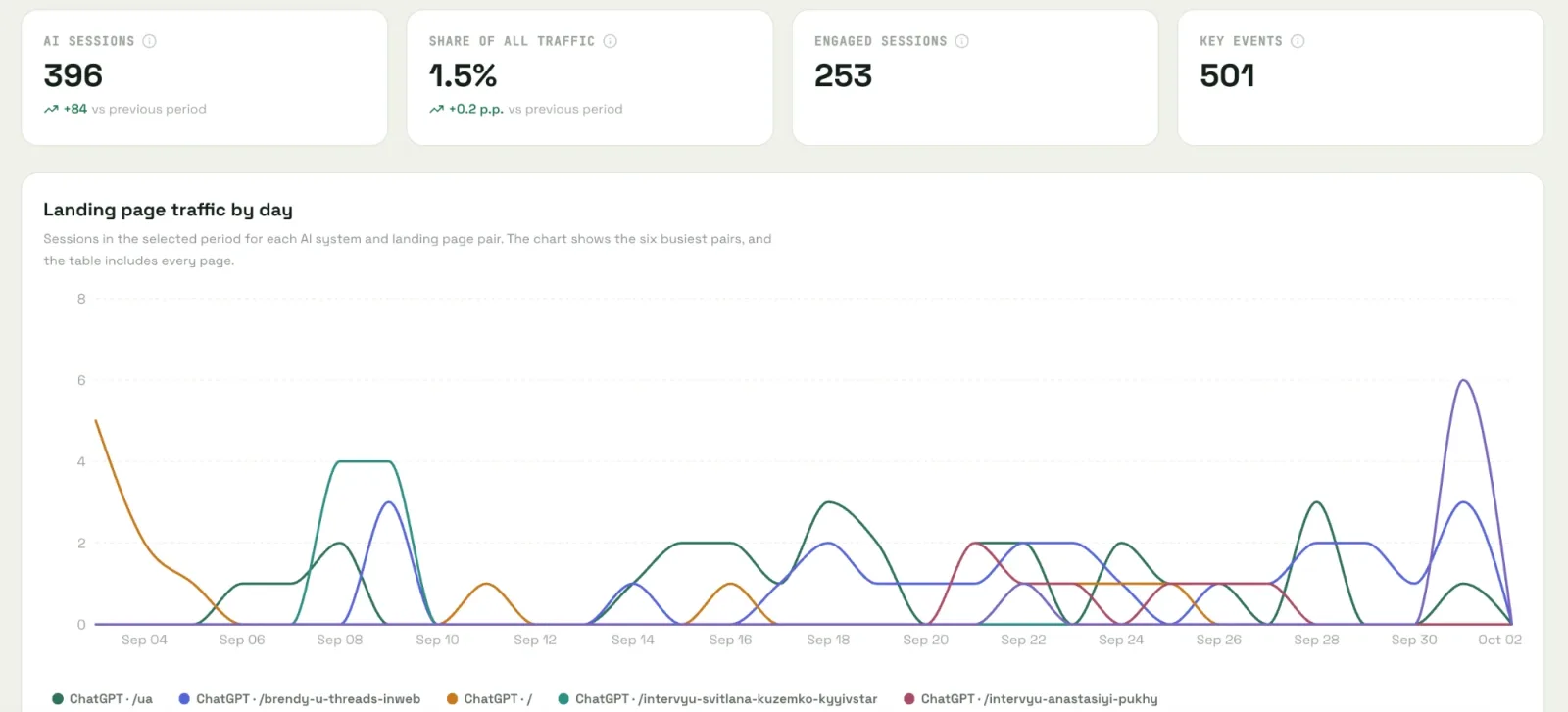
The report lets you compare sessions with landing pages and review clicks alongside monitored mentions and citations. For example, you can see whether a page cited by an AI system also brings sessions to the site. Perplexity may appear as a traffic source if GA4 sends the corresponding domain. VYDAI does not monitor brand mentions in Perplexity; brand monitoring covers ChatGPT, Gemini, Claude, Google AI Overviews, and Google AI Mode.
The report is available after Google Analytics is connected in the settings for a specific project. A small site may be fine with GA4 and a custom channel group; VYDAI puts AI traffic beside mention and answer-source data. See the VYDAI demo or create an account.